 ReadbackRDO
Menu
Build 10 · iPhone storyboard
Hear it.
Read it back.
ReadbackRDO turns a compatible aircraft headset receive feed into readable text on iPhone, giving pilots an advisory visual reference when radio traffic gets busy.
Advisory only — not a clearance. Keep listening, verify every instruction, and make the required readback.
This 10.5-second sequence uses simulator fixtures and disclosed website-only staging. Internal validation only; public availability is not established.
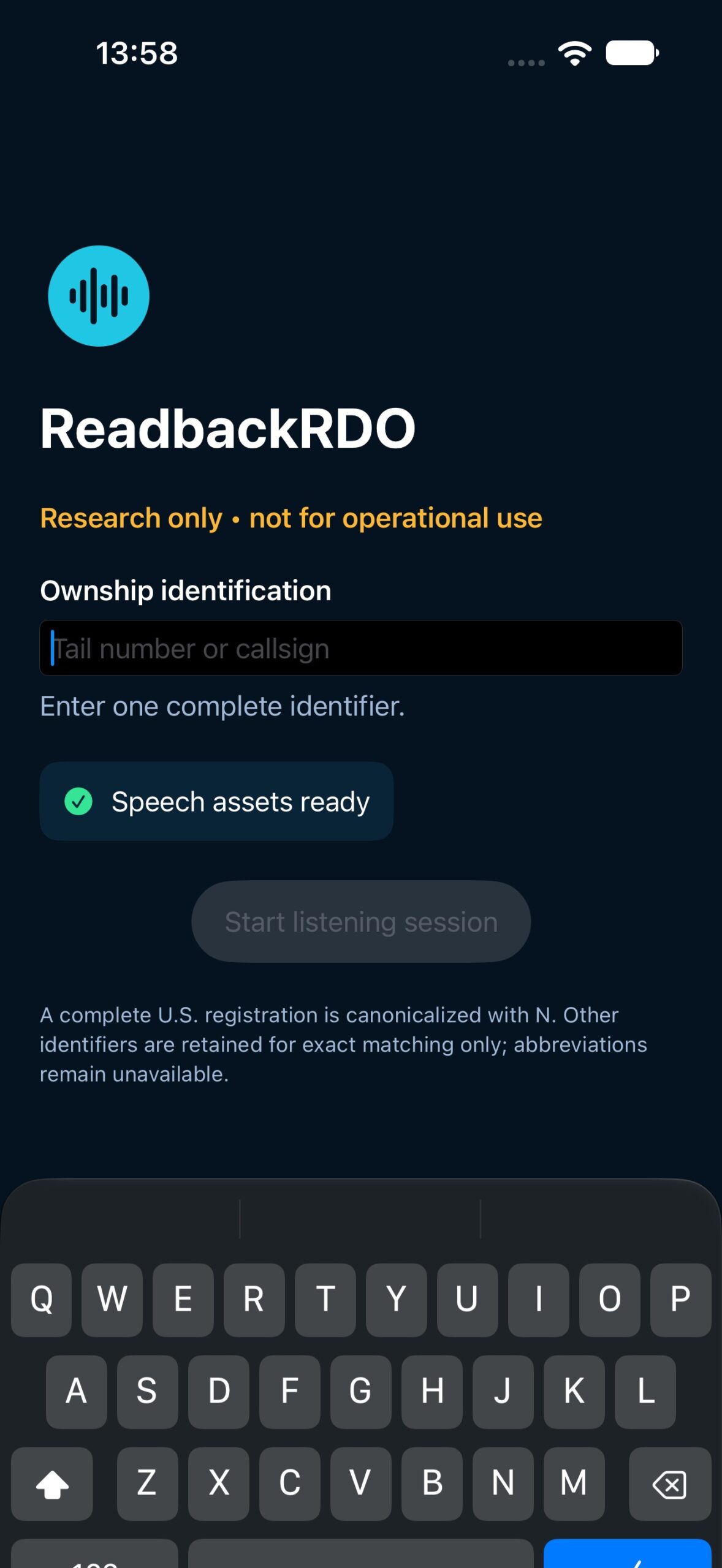
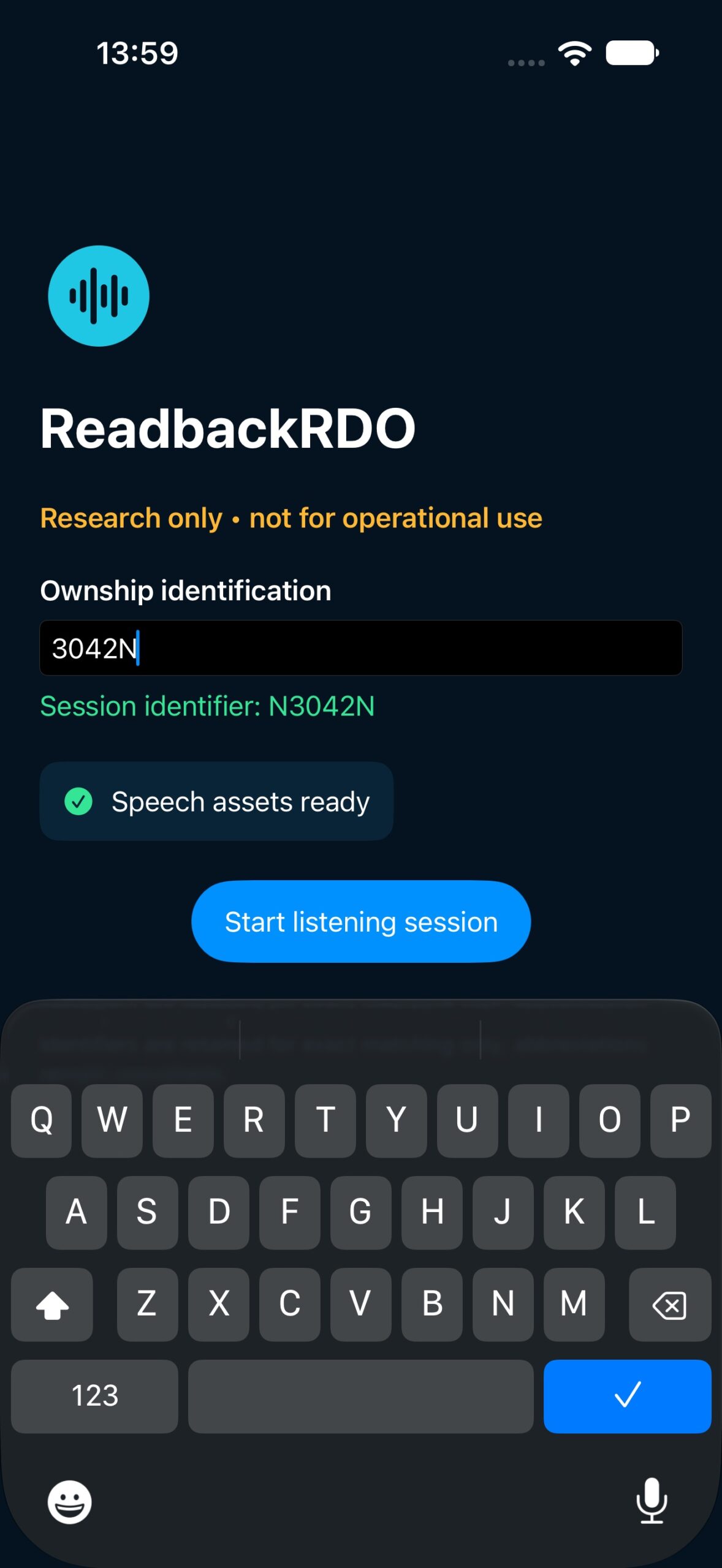
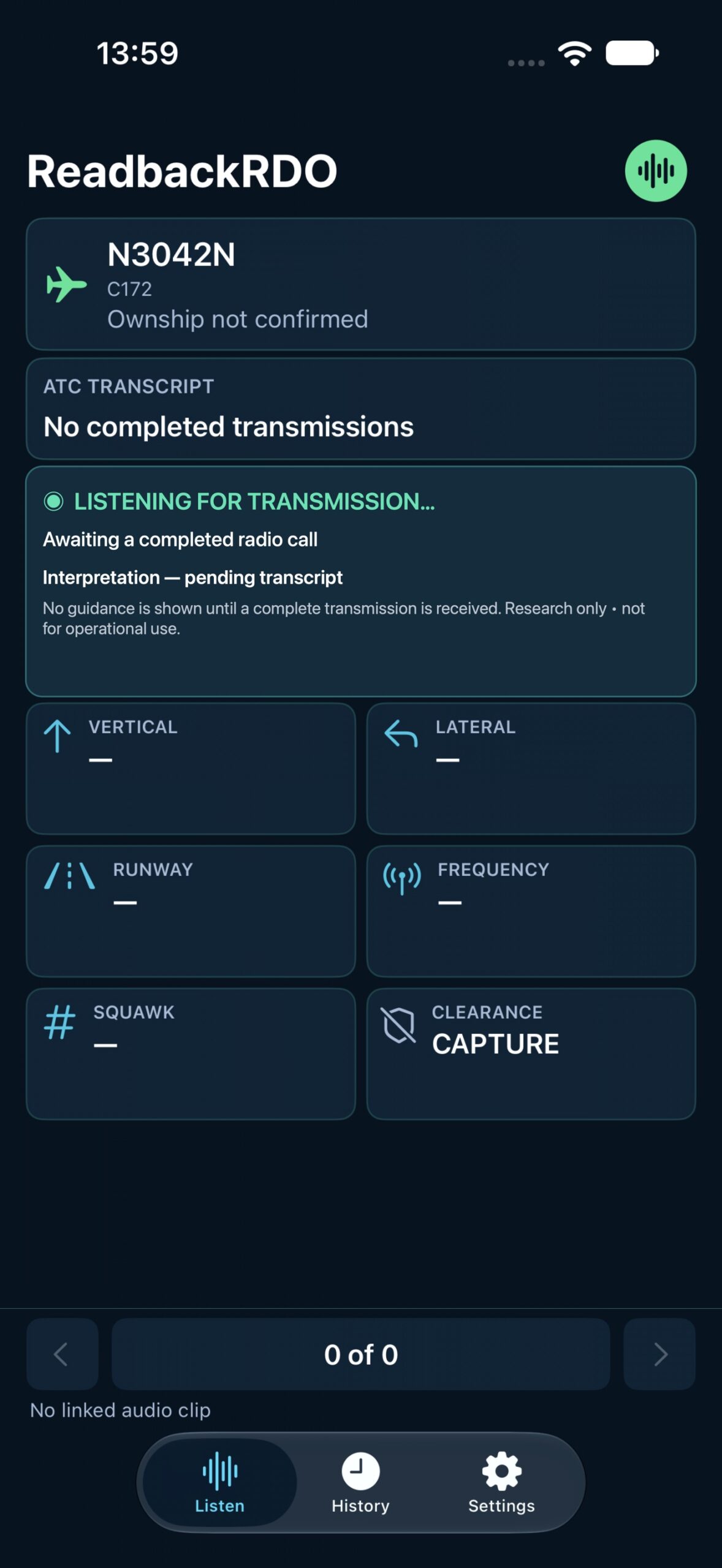
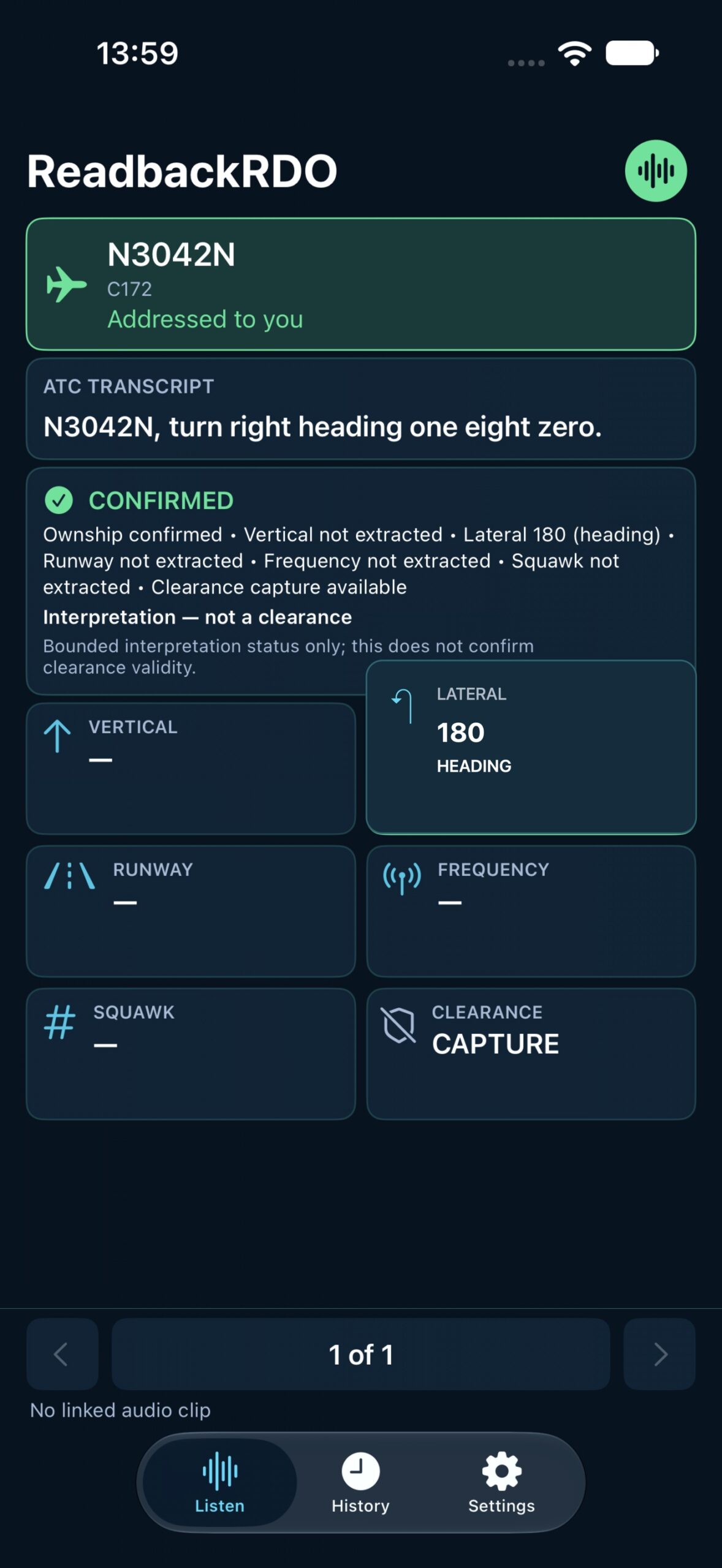
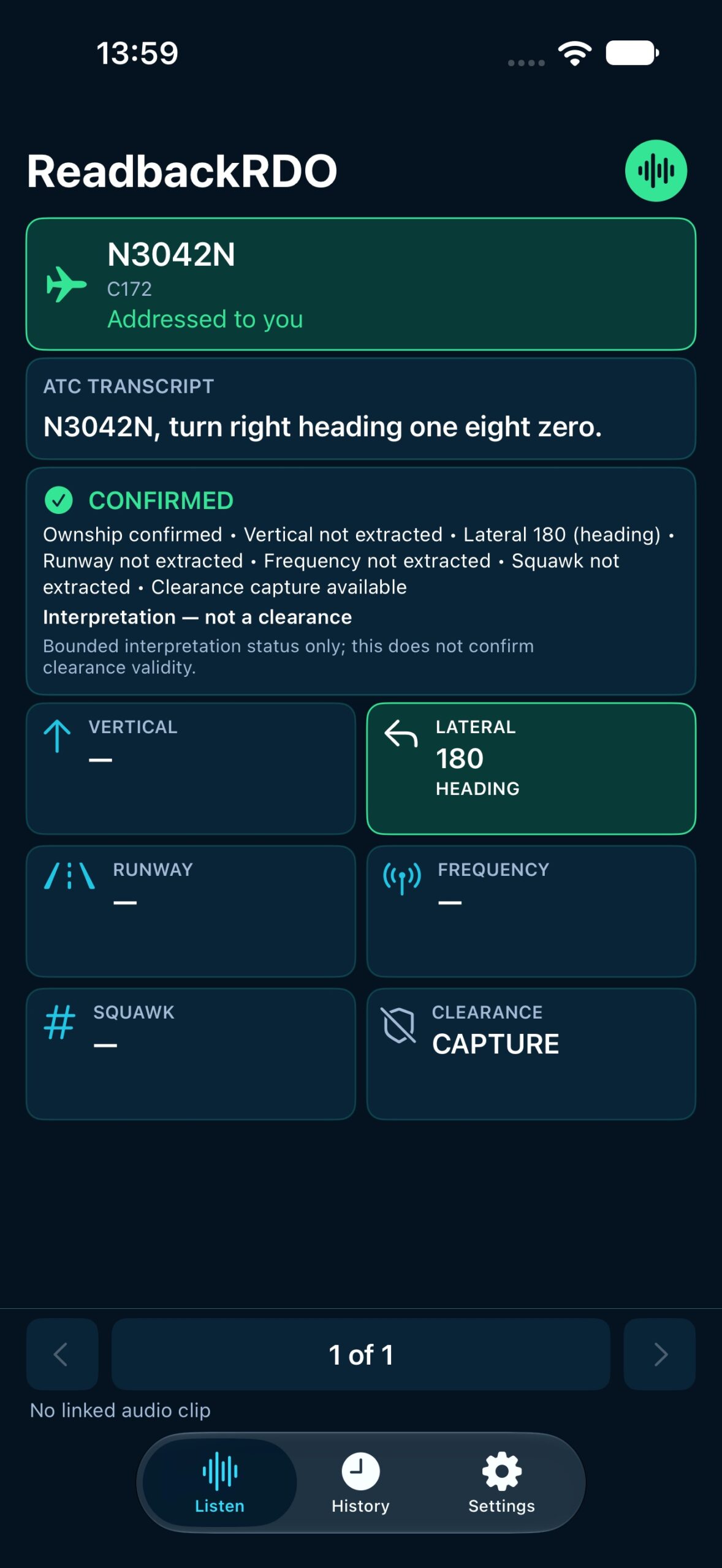
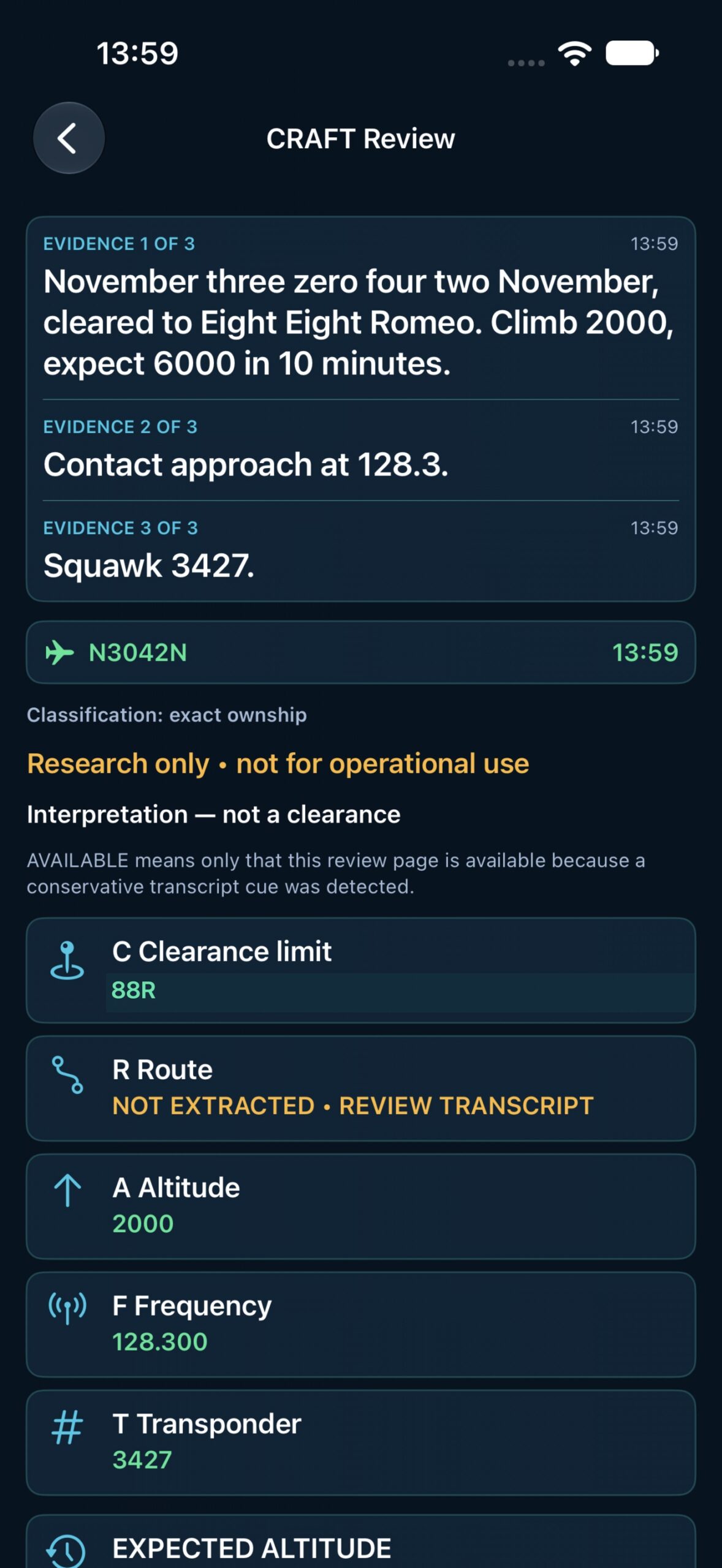
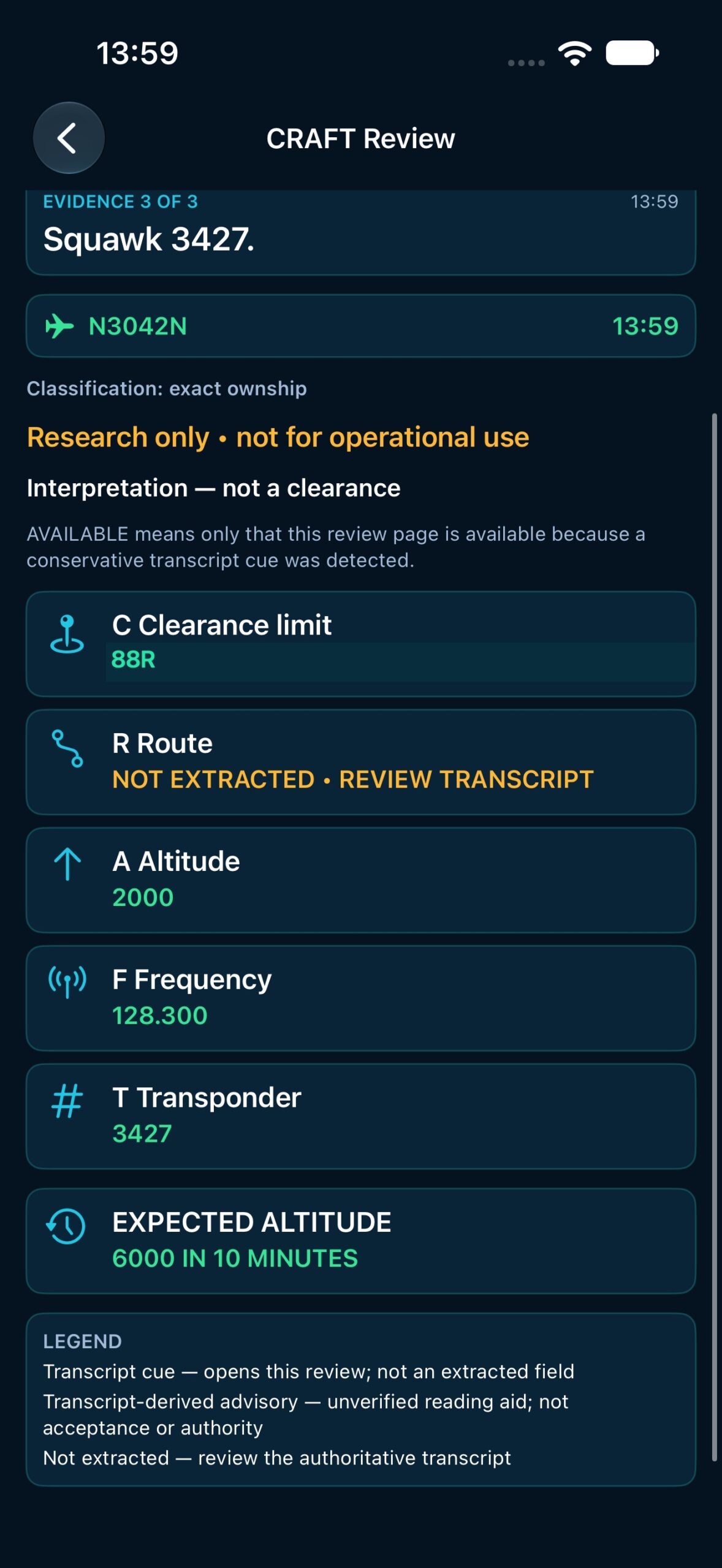
FRAME 01 OF 7 · 0.0–1.5 s
Start empty
Enter a complete ownship identifier before beginning.
Authentic simulator capture.
10.5-second loop · Choose a frame or use ← → Home End. Playback pauses on hover or focus.
Simulator-based illustration. Frames 03 and 04 use website-only staging; frames 06 and 07 correct the C value to the approved parser-test expectation. These are not untouched app captures or an operational clearance.
A second way to reference a call
Radio traffic does not wait for a quiet moment.
Calls can arrive during checklists, taxi, turbulence, training, or congested frequencies. A pilot cannot replay a live transmission. After speech recognition completes a result, ReadbackRDO presents its literal text for review. The text supports confirmation; the radio and the pilot’s judgment remain primary.
01 / How it works
A receive-audio path to the phone.
Four deliberate steps, with the normal headset and microphone path preserved.
- 01
Connect the adapter
Insert a purpose-built aviation recording adapter into a compatible headset/intercom receive path.
- 02
Connect iPhone
Connect the adapter’s supported digital USB-C audio output to the iPhone.
- 03
Confirm the route
Verify the iPhone selected USB audio input, then start ReadbackRDO.
- 04
Listen normally
Completed speech-recognition results appear as literal text for review.
The intended path does not transmit to the aircraft, key push-to-talk, modify the intercom, or control the radio.
02 / Hardware
Portable receive-audio path
Connector geometry matters. This diagram describes a conventional fixed-wing dual-plug example—not universal compatibility or an approved installation.
/ intercomReceive output
recording adapterFemale headset pass-through
Headset receive plug: connects to the adapter’s female ¼-inch pass-through.
Separate PJ-068 microphone/PTT plug: stays connected directly to the aircraft in the normal way.
No transmit or radio control from iPhone to aircraft.
Identify the connectors
Conventional fixed-wing dual-plug headsets separate PJ-055 headphone/receive from PJ-068 microphone/PTT. Aircraft, helicopters, military installations, and six-pin/LEMO systems differ. Confirm the actual aircraft and headset connectors before purchase or use.
Confirm the electrical path
Aircraft headset audio is not automatically consumer mic or line level. A generic passive phone-jack-to-USB-C cable is not a recommendation. The interface must supply appropriate pass-through, levels/loading, conversion or supported smartphone-mic path, and iPhone compatibility.
Do not assume isolation
The cited NFlightCam page mentions a “noise-canceling audio circuit” but does not publish galvanic isolation, transformer, impedance, attenuation, or certification specifications. Confirm those details with the manufacturer and ground-test the exact chain.
NFlightCam describes recording what the user hears and says through the headset. This is not an independently isolated “ATC-only” feed. Its “standard PJ jack” wording does not establish an exact tap pinout.
03 / Compatibility
Confirm before buying.
These are third-party examples to investigate, not requirements, endorsements, or verified ReadbackRDO compatibility.
NFlightCam smartphone cable · fixed-wing SKU 409C
The manufacturer lists SKU 409C for USB-C iPhones/iPads and describes standard twin-plug headsets, a standard PJ jack, and headset pass-through. Confirm current SKU, connector, iPhone model, app input detection, electrical loading/isolation, return policy, and price before purchase.
Manufacturer detailsOther cable and interface paths
409/409H use a smartphone-style 3.5 mm path; a USB-C adapter chain is not established here. NFlightCam’s 430-family digital recorder/camera cable expressly does not work with phones. Apple’s USB-C headphone adapter does not establish this aviation mic-input chain.
RØDE AI-Micro is a mic-oriented USB interface, not documented for raw aircraft headset-level audio. Consider it only after a purpose-built adapter provides a compatible output and manufacturers confirm levels, loading, isolation, and wiring.
| Aircraft / headset path | Current evidence |
|---|---|
| Standard fixed-wing dual-plug PJ | Manufacturer-described 409C smartphone/USB-C option; exact setup still needs confirmation. |
| Helicopter U-174 / U-92 style | Confirm model-specific path. |
| Six-pin / LEMO panel-powered | Confirm model-specific path. |
| Other or special installations | Confirm model-specific path. |
Ground-test checklist
- Match the aircraft jack, headset plug, adapter variant, and iPhone port.
- With the aircraft safely parked, verify normal headset audio, microphone/PTT, intercom, sidetone, and volume.
- Confirm iPhone reports active USB audio input—not the built-in microphone.
- Check for clipping, low level, hum, channel loss, or changed headset volume.
- Secure cables clear of flight controls, egress, and required equipment.
- If normal audio or controls change, disconnect the adapter and use the standard headset path.
- Follow aircraft, operator, instructor, manufacturer, and applicable maintenance guidance. This is not an installation approval.
04 / The app
The transcript is the reference. Interpretation is bounded.
The iPhone prototype uses Apple speech-recognition components and accepts an active USB input route. It is under TestFlight/internal validation—not established as publicly available in the App Store.
Completed recognizer text
The main display preserves literal recognition output. Recognition quality varies with Apple Speech, radio and intercom quality, adapter performance, accents, speed, overlap, and noise.
History and guarded fields
Current-session history and ownship/interpretation states can appear. Individual fields appear only when strict callsign, speaker-provenance, context, grammar, and safety gates pass. A blank field means evidence was insufficient, not that the instruction was absent.
Advisory only — not a clearance
CRAFT is not a clearance
A separate CRAFT transcript-review aid exists. Production Apple Speech input has unknown/mixed speaker provenance. The signed Release path must not be described as extracting a complete clearance: clearance limit and route remain unextracted, and other fields may stay blank.
Advisory only — not a clearance
In the cockpit
Connect → Confirm USB input → Listen normally → Glance only when workload permits → Verify against the radio → Make the required readback.
iPhone does the work
Audio capture, speech recognition, literal transcript, current-session history, and bounded interpretation/review.
Watch is a companion
A Watch can display a phone-produced snapshot and may receive a tightly gated advisory ownship alert. The Watch does not listen, transcribe, parse, acknowledge, or control the radio. Delivery timing is not guaranteed.
05 / Safety & limitations
A useful visual aid must show its limits.
Advisory only. Not an ATC clearance authority. Keep listening, verify every instruction, and make the required readback.
Recognition can be wrong or incomplete. Overlap, noise, weak or clipped audio, accents, rapid speech, radio distortion, and adapter/intercom differences all matter.
Fields intentionally stay blank. Strict callsign, provenance, context, and safety gates suppress interpretation when evidence is ambiguous.
CRAFT is a review cue. Speaker-provenance limits prevent a claim of complete-clearance extraction or operational authorization.
Testing is still internal. Build 1.0 (9) passed targeted checks; the wider recorded suite had 213 of 219 tests pass, three pre-existing failures, and three skips. A physical microphone lifecycle check did not establish aircraft-radio transcription accuracy.
No operational qualification claim. No FAA approval, certification, airworthiness approval, guaranteed latency, accuracy, or safety enhancement is established.
06 / Questions pilots ask
Straight answers.
What does ReadbackRDO do?
It presents completed speech-recognition results from a compatible aircraft headset receive feed as literal text on iPhone, with conservative review cues.
Does it replace listening or my readback?
No. Listen to the radio, verify every instruction, and make the required readback yourself.
Is it an ATC clearance authority?
No. Any interpretation is advisory only—not a clearance.
Is it in the App Store?
Public App Store availability is not established. The iPhone prototype is in TestFlight/internal validation.
Does it work offline?
Offline behavior is not promised. Apple Speech assets, runtime behavior, and field conditions need release-specific verification.
Will any USB-C audio cable work?
No. Use a purpose-built, compatible aviation recording path, then verify the complete adapter, interface, iPhone, and app input chain.
Does it transmit or key the radio?
No. The intended path captures receive audio toward the iPhone; it does not transmit to the aircraft or control push-to-talk.
Which aircraft and headsets work?
Model-specific confirmation is required. Standard fixed-wing PJ/twin-plug is the manufacturer-described path for the cited 409C option; other connectors need their own confirmed path.
Why are some fields blank?
The app withholds them when callsign, speaker provenance, grammar, context, or safety evidence is insufficient. Blank does not mean the instruction was absent.
What is CRAFT?
A conservative transcript-review workflow, not a complete parsed or authorized clearance.
What does Apple Watch do?
It is a display-only companion for phone-produced snapshots and possibly tightly gated advisory alerts. Delivery is best-effort, not real-time or safety-critical.
Can I buy the cable from ReadbackRDO?
No ReadbackRDO cable sale is established. The optional manufacturer link above is for third-party product information and purchase.
07 / Privacy
Privacy details are being documented.
Microphone/audio access is required for transcription. Privacy details for the current test build are being documented before public release.
The release-specific review still needs to establish on-device versus network speech behavior, speech-asset setup, optional recording, stored transcripts/audio/diagnostics/settings, retention and deletion, analytics or crash reporting, third-party transfer, and what reaches Apple Watch. No “fully offline,” “audio never leaves the device,” or “no data collected” claim is made here.
08 / Follow the project
Interested in testing or sharing cockpit workflow feedback?
Tell ReadbackRDO about your aircraft/headset setup and the radio workflow you want to evaluate. Contact does not imply immediate test access, a shipping date, or paid availability.